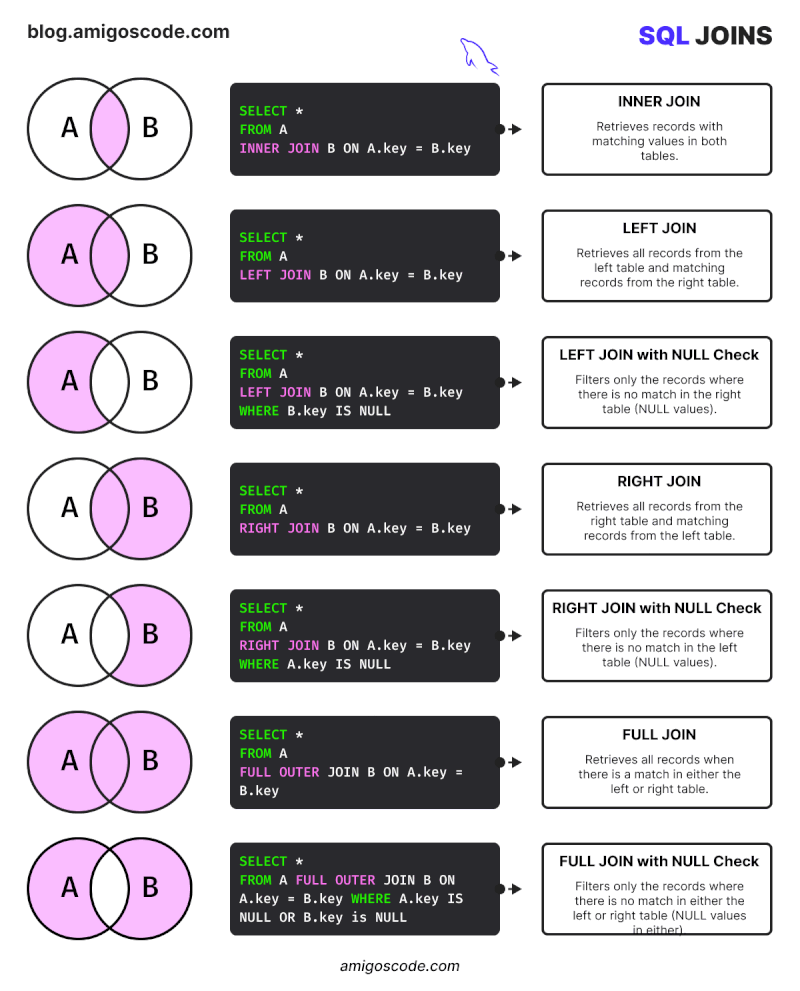
Here’s a breakdown of 7 essential joins:
𝗙𝗶𝗻𝗱𝗶𝗻𝗴 𝗠𝗮𝘁𝗰𝗵𝗲𝘀:
• 𝗜𝗻𝗻𝗲𝗿 𝗝𝗼𝗶𝗻: Get records with matching values in both tables. This retrieves only rows with data in common.
𝗣𝗿𝗶𝗼𝗿𝗶𝘁𝗶𝘇𝗶𝗻𝗴 𝗧𝗮𝗯𝗹𝗲𝘀:
• 𝗟𝗲𝗳𝘁 𝗝𝗼𝗶𝗻: Show all records from the left table, along with any matching records from the right table.
• 𝗥𝗶𝗴𝗵𝘁 𝗝𝗼𝗶𝗻: Opposite of a left join, this prioritizes the right table, showing all its records and any matching ones from the left.
𝗜𝗱𝗲𝗻𝘁𝗶𝗳𝘆𝗶𝗻𝗴 𝗠𝗶𝘀𝘀𝗶𝗻𝗴 𝗟𝗶𝗻𝗸𝘀:
• 𝗟𝗲𝗳𝘁/𝗥𝗶𝗴𝗵𝘁 𝗝𝗼𝗶𝗻 𝘄𝗶𝘁𝗵 𝗡𝘂𝗹𝗹 𝗖𝗵𝗲𝗰𝗸: Need to see records with NO match in the other table? These joins filter out matched records, revealing unmatched entries. Perfect for analyzing inactive users or out-of-stock items.
𝗦𝗲𝗲𝗶𝗻𝗴 𝘁𝗵𝗲 𝗕𝗶𝗴 𝗣𝗶𝗰𝘁𝘂𝗿𝗲:
• 𝗙𝘂𝗹𝗹 𝗝𝗼𝗶𝗻: Get ALL records from both tables, even if there’s no match. This provides a complete view, highlighting missing data points.
Deixe um comentário