Blog

  • React vs Next.js

    Both Next.js and React are powerful tools for building web applications, but they have distinct differences that cater to different needs. Here’s a breakdown:

    What they are:

    • React: A JavaScript library for building user interfaces (UI) components. It’s lightweight and flexible, offering building blocks to create dynamic and interactive web pages.
    • Next.js: A framework built on top of React that adds features and structure to the development process. It offers server-side rendering, routing, data fetching, and other functionalities out-of-the-box.

    Key Differences:

    [table id=2 /]

    Choosing the right tool:

    • React: If you need maximum flexibility and control over your UI components, or plan to build a complex, dynamic web application with unique features.
    • Next.js: If you prioritize faster development, SEO optimization, pre-rendering for performance, and a framework that handles common web application needs like routing and data fetching.

    Additional points:

    • You can use React components within Next.js applications.
    • Next.js is constantly evolving, offering new features and improvements.
    • Both React and Next.js have large and active communities for support and learning.

    Ultimately, the best choice depends on your specific project requirements and your development preferences. Consider the pros and cons of each option carefully before making your decision.

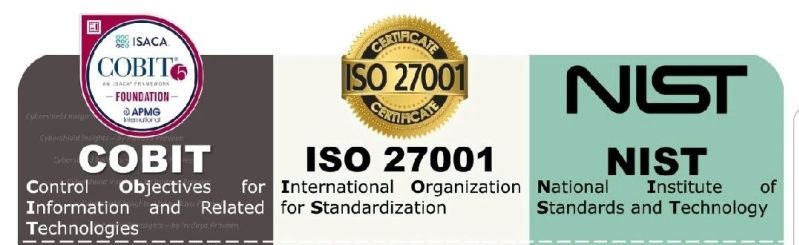
  • Differences between COBIT, ISO 27001 and NIST

    Differences between COBIT, ISO 27001 and NIST

    The main differences between COBIT, ISO 27001, and NIST are as follows:

    Focus and Core Area:

    • COBIT: Focuses on IT governance and management, providing a comprehensive framework for the effective control and management of IT processes.
    • ISO 27001: Focuses on information security management, providing a systematic approach to managing information security risks and implementing an Information Security Management System (ISMS).
    • NIST: Focuses on enhancing the security and resilience of information systems, providing guidance and standards for managing cybersecurity risks.

    Source and Application:

    • COBIT: Developed by ISACA and widely used in large enterprises to ensure effective governance and management of IT.
    • ISO 27001: Developed by the International Organization for Standardization (ISO) and widely used across various sectors and sizes to implement and manage an Information Security Management System.
    • NIST: Developed by the National Institute of Standards and Technology (NIST) and primarily used in the United States as a framework for enhancing the security and resilience of information systems. However, it has gained widespread acceptance and international implementation as well.

    Geographic Orientation:

    • COBIT and ISO 27001: These are international frameworks and are globally recognized. They can be used in any country or industry.
    • NIST: It is primarily an American framework and used mainly in the United States. However, it has also gained broad acceptance and international application.

    Scope and Detail:

    • COBIT: Provides a comprehensive framework for IT governance and management, encompassing a wide range of processes, controls, and guidelines.
    • ISO 27001: Primarily focuses on information security management and provides a set of effective security requirements and controls.
    • NIST: Offers a comprehensive set of guidelines and standards for improving the security and resilience of information systems, including a catalog of recommended security controls.

    In summary, COBIT focuses on IT governance and management, ISO 27001 focuses on information security management, and NIST focuses on enhancing the security and resilience of information systems.

  • Discover WP-CLI for creating and maintaining WordPress websites

    Imagine managing your WordPress site without ever touching the admin panel. That’s the power of WP-CLI, a command-line interface that lets you control your website directly from your terminal. Think of it as a Swiss Army knife for WordPress power users, letting you do everything from installing plugins and themes to updating your core software and managing user accounts, all with simple text commands.

    Here are some of the things you can do with WP-CLI:

    • Automate tasks: Run repetitive tasks like backups, updates, and database optimization with a single command, freeing up your time for more important things.
    • Manage your site from anywhere: No need to be in front of a specific computer to manage your site. Access WP-CLI from any machine with a terminal and an internet connection.
    • Increase efficiency: Typing commands is often faster than clicking through menus, especially for frequent tasks.
    • Reduce errors: Command-line commands are less prone to human error than clicking around the admin panel.
    • Extend WordPress functionality: WP-CLI has a vibrant community that develops plugins and extensions, adding even more capabilities to the tool.

    Whether you’re a developer, a sysadmin, or just a power user who wants to take control of your WordPress site, WP-CLI is a valuable tool to have in your arsenal.

    If you’re interested in learning more about WP-CLI, check out the official website: https://wp-cli.org/

    And if you’re a cPanel Admin, you may be interested in how to install it even in a shared hosting without root nor sudo access.

    I hope this helps! Let me know if you have any other questions.

  • A Web Duradoura: Como o W3C moldou a última década e além

    A Web Duradoura: Como o W3C moldou a última década e além

    A World Wide Web, essa extensa tapeçaria de informação e interação, raramente é uma entidade estática. Na última década, ela deixou de ser uma curiosidade ligada ao desktop para se transformar em um cenário interativo e voltado para dispositivos móveis. No centro desta evolução está o World Wide Web Consortium (W3C), uma força silenciosa e colaborativa que molda os próprios alicerces da web.

    Dos Pixels à Acessibilidade: A década de 2010 viu o HTML5 emergir como o novo padrão, abrindo caminho para experiências multimídia mais ricas e aplicações web interativas. Canvas, WebGL e Web Audio desbloquearam o potencial criativo da web, permitindo jogos envolventes, gráficos 3D e animações cativantes. Mas o foco do W3C não estava apenas nos sinos e assobios. Padrões de acessibilidade como WCAG 2.1 garantiram que os sites pudessem ser usados por todos, independentemente da habilidade. Esta abordagem inclusiva lançou as bases para um ambiente online mais equitativo e acessível.

    A ascensão do celular: à medida que os smartphones se tornaram onipresentes, o W3C se adaptou. Os princípios de design responsivo consagraram a adaptabilidade da web, garantindo que os sites tivessem uma aparência e funcionassem perfeitamente em diferentes tamanhos de tela. AMP, uma estrutura para carregamento rápido de páginas móveis, atendeu à necessidade de acesso instantâneo a informações em qualquer lugar. Essas inovações capacitaram os usuários móveis, tornando a web uma plataforma verdadeiramente acessível e conveniente para todos.

    Além do navegador: a influência do W3C vai muito além das páginas da web. WebRTC, um protocolo de comunicação em tempo real, revolucionou a colaboração online, permitindo videoconferências e comunicação ponto a ponto diretamente no navegador. Tecnologias descentralizadas, como WebAssembly e Service Workers, capacitaram os desenvolvedores a criar aplicativos da Web poderosos e com capacidade off-line, confundindo os limites entre os aplicativos da Web e os aplicativos nativos.

    O Futuro, Tecido em Código: Ao entrarmos na próxima década, o trabalho do W3C continua. O WebXR promete experiências imersivas além das telas, enquanto o WebGPU libera o poder das unidades de processamento gráfico para visuais impressionantes. As preocupações com privacidade e segurança são abordadas com iniciativas como o Privacy Sandbox, garantindo uma web mais segura e controlada pelo usuário.

    Os heróis desconhecidos: o impacto do W3C raramente é atribuído a uma única entidade. É um esforço colaborativo conduzido por inúmeras pessoas: desenvolvedores apaixonados, pesquisadores dedicados e empresas com visão de futuro. Seu trabalho, entrelaçado na própria estrutura da teia, garante que ela permaneça aberta, acessível e em constante evolução.

    A influência do W3C na web na última década foi profunda. Não só moldou a forma como interagimos com a informação, mas também incutiu princípios de acessibilidade, inovação e colaboração. À medida que a Web continua a sua jornada rumo ao futuro, uma coisa é certa: o W3C continuará a ser uma força orientadora, tecendo os fios da tecnologia numa tapeçaria de possibilidades infinitas.

  • Instalando WP-CLI em uma hospedagem compartilhada cPanel

    Instalando WP-CLI em uma hospedagem compartilhada cPanel

    Se você possui acesso de nível raiz ao seu servidor, é recomendável seguir este guia para instalar o WP CLI em seu servidor WHM/cPanel: https://blog.cpanel.com/wp-cli-install-and-manage-wordpress-on-the-command-line/.

    No entanto, se você não tiver acesso à conta root ou não conseguir executar o sudo, mas ainda tiver acesso de nível de usuário ao terminal (como no terminal cPanel), você ainda poderá instalar e usar o wp-cli.

    cd /home/USERNAME/public_html/
    curl -O https://raw.githubusercontent.com/wp-cli/builds/gh-pages/phar/wp-cli.phar

    chmod +x wp-cli.phar

    /home/USERNAME/public_html/wp-cli.phar config list

    Claro, substitua USERNAME pelo seu. Comente abaixo se tiver alguma dúvida, talvez possa ser solucionado.

  • Bridging the Gap: When UX/UI Design Misses the Mark on W3C Guidelines

    The quest for a seamless, intuitive user experience (UX) and visually captivating user interface (UI) is at the heart of every successful website or app. However, in the pursuit of these goals, the UX/UI design market often stumbles upon a crucial hurdle – misinterpreting or neglecting the real usability and accessibility guidelines set forth by the World Wide Web Consortium (W3C). This disconnect can have dire consequences, excluding users with disabilities and hindering overall user experience.

    Common Misunderstandings:

    • Confusing WCAG Compliance with Accessibility Checklists: Accessibility isn’t a checkbox exercise. While WCAG (Web Content Accessibility Guidelines) provide a valuable framework, simply ticking off its requirements doesn’t guarantee a truly accessible experience. Designers need to understand the underlying principles of accessibility and how they translate into real-world user interactions.
    • Prioritizing Aesthetics over Usability: Striking visuals can certainly enhance user engagement, but not at the cost of usability. Overly complex layouts, non-intuitive navigation, and illegible text can alienate users and render the website unusable for many. Remember, form should always follow function.
    • Neglecting Assistive Technologies: Many users rely on assistive technologies like screen readers and keyboard navigation. Designers must ensure their creations are compatible with these tools, allowing users with disabilities to navigate and interact with the content effectively.

    Bridging the Gap:

    • Education and Awareness: The UX/UI design community needs to prioritize education and awareness about W3C guidelines and best practices for accessibility. Workshops, online resources, and collaborative initiatives can foster a deeper understanding of these principles.
    • Empathy-Driven Design: Design thinking that goes beyond aesthetics and considers the diverse needs of all users is crucial. Personas, user testing with assistive technologies, and accessibility audits can help designers identify and address potential usability and accessibility barriers.
    • Accessibility Tools and Integrations: Integrating accessibility tools and plugins into design workflows can streamline the process of creating inclusive experiences. Automated checks, color contrast checkers, and keyboard navigation testing tools can provide valuable feedback throughout the design process.

    Benefits of Getting It Right:

    Implementing W3C guidelines and prioritizing accessibility isn’t just about compliance; it’s about good design. A website or app that is truly usable and accessible benefits everyone:

    • Increased Reach: A wider audience, including users with disabilities, can access and engage with your content.
    • Enhanced SEO: Search engines prioritize websites that meet accessibility standards, boosting your online visibility.
    • Improved User Experience: A website that’s easy to navigate and understand for everyone leads to higher user satisfaction and loyalty.

    Moving Forward:

    The UX/UI design market has the power to create not just beautiful interfaces but truly inclusive experiences for all users. By bridging the gap between design aesthetics and W3C guidelines, we can ensure that the web remains a platform for everyone, fostering a more equitable and user-friendly digital world.

    Remember: Accessibility isn’t just a technical checkbox; it’s about empathy, inclusivity, and creating a web that works for everyone. Let’s all work together to make the web a truly universal space.

    Additional Resources:

    Let’s keep the conversation going! Share your thoughts and experiences on how to bridge the gap between UX/UI design and W3C accessibility guidelines in the comments below.

  • The Enduring Web: How W3C Shaped the Last Decade and Beyond

    The Enduring Web: How W3C Shaped the Last Decade and Beyond

    The World Wide Web, that sprawling tapestry of information and interaction, is rarely a static entity. Over the past decade, it has transformed from a desktop-bound curiosity to a mobile-first, interactive landscape. At the heart of this evolution lies the World Wide Web Consortium (W3C), a quiet, collaborative force shaping the web’s very foundation.

    From Pixels to Accessibility: The 2010s saw HTML5 emerge as the new standard, paving the way for richer multimedia experiences and interactive web applications. Canvas, WebGL, and Web Audio unlocked the web’s creative potential, allowing for immersive games, 3D graphics, and captivating animations. But W3C’s focus wasn’t solely on bells and whistles. Accessibility standards like WCAG 2.1 ensured websites were usable by everyone, regardless of ability. This inclusive approach laid the groundwork for a more equitable and accessible online environment.

    The Rise of Mobile: As smartphones became ubiquitous, W3C adapted. Responsive design principles enshrined the web’s adaptability, ensuring websites looked and functioned flawlessly across different screen sizes. AMP, a framework for fast-loading mobile pages, addressed the need for instant information access on the go. These innovations empowered mobile users, making the web a truly accessible and convenient platform for everyone.

    Beyond the Browser: W3C’s influence extends far beyond web pages. WebRTC, a real-time communication protocol, revolutionized online collaboration, enabling video conferencing and peer-to-peer communication directly within the browser. Decentralized technologies like WebAssembly and Service Workers empowered developers to build powerful, offline-capable web applications, blurring the lines between web and native apps.

    The Future, Woven in Code: As we enter the next decade, W3C’s work continues. WebXR promises immersive experiences beyond screens, while WebGPU unlocks the power of graphics processing units for stunning visuals. Privacy and security concerns are tackled with initiatives like Privacy Sandbox, ensuring a safer and more user-controlled web.

    The Unsung Heroes: W3C’s impact is rarely attributed to a single entity. It’s a collaborative effort driven by countless individuals: passionate developers, dedicated researchers, and forward-thinking companies. Their work, woven into the very fabric of the web, ensures that it remains open, accessible, and ever-evolving.

    In conclusion, the W3C’s influence on the web over the past decade has been profound. It has not only shaped the way we interact with information but also instilled principles of accessibility, innovation, and collaboration. As the web continues its journey into the future, one thing is certain: the W3C will remain a guiding force, weaving the threads of technology into a tapestry of endless possibilities.

  • Installing WP-CLI on a cPanel shared hosting

    Installing WP-CLI on a cPanel shared hosting

    If you possess root-level access to your server, it is recommended that you follow this guide to install WP CLI on your WHM/cPanel server: https://blog.cpanel.com/wp-cli-install-and-manage-wordpress-on-the-command-line/.

    However, if you lack access to the root account or aren’t able to run sudo, but still have user-level access to the terminal (such as from the cPanel terminal), you can still install and use wp-cli.

    cd /home/USERNAME/public_html/
    curl -O https://raw.githubusercontent.com/wp-cli/builds/gh-pages/phar/wp-cli.phar

    chmod +x wp-cli.phar

    /home/USERNAME/public_html/wp-cli.phar config list

    Of course, replace USERNAME to yours.

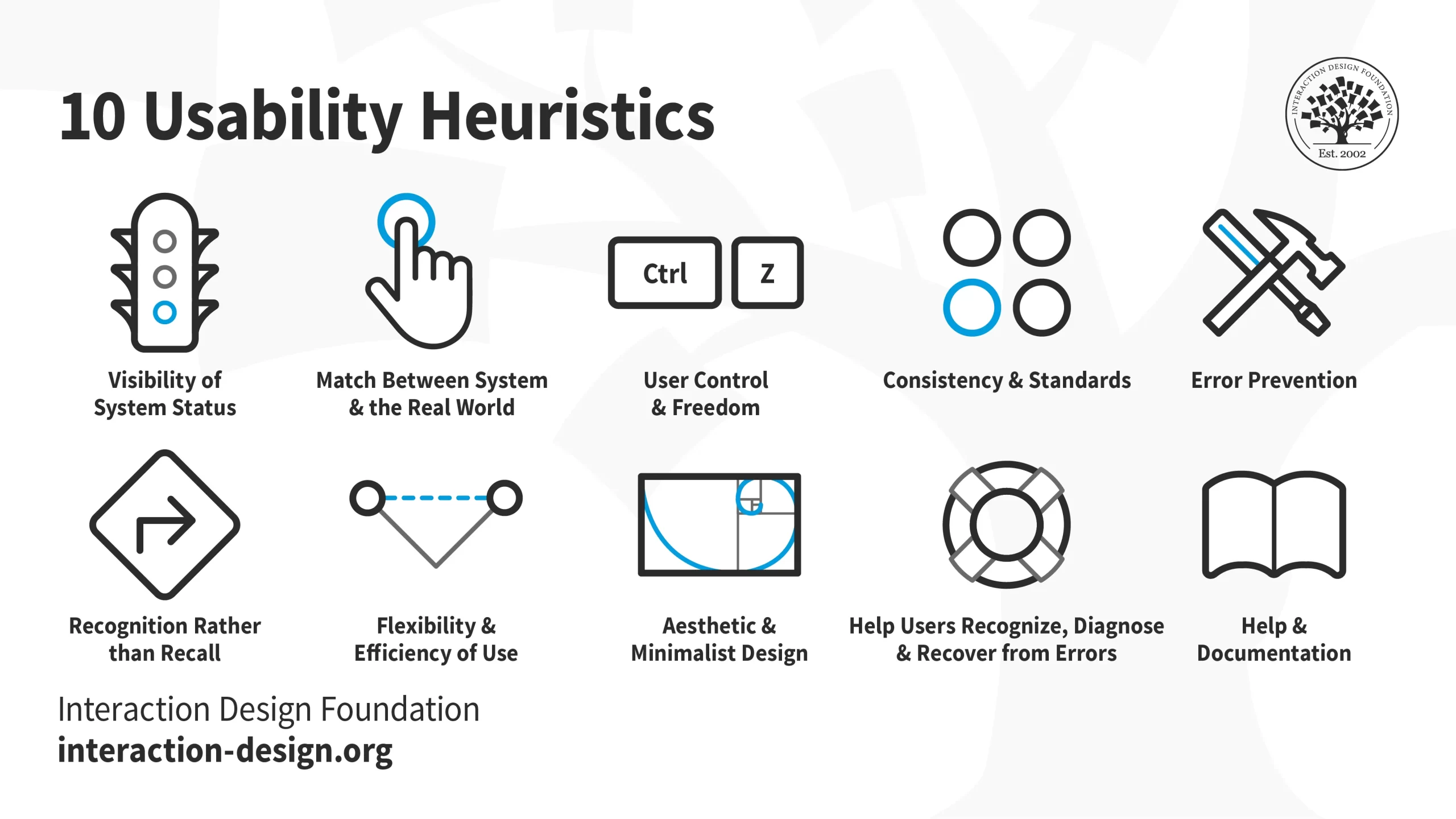
  • Heurísticas de Nielsen: 10 princípios para interfaces intuitivas e utilizáveis

    Heurísticas de Nielsen: 10 princípios para interfaces intuitivas e utilizáveis

    Jakob Nielsen, um pioneiro no campo da usabilidade da web, desenvolveu um conjunto de 10 heurísticas na década de 1990 que se tornaram a base do design da interface do usuário (UI). Esses princípios, agora conhecidos como Heurísticas de Nielsen, fornecem uma estrutura para a criação de interfaces fáceis de aprender, eficientes de usar e agradáveis de interagir.

    Vamos nos aprofundar em cada uma dessas 10 heurísticas e explorar como elas podem ser aplicadas para melhorar a usabilidade do seu site, aplicativo ou qualquer outro produto digital:

    1. Visibilidade do status do sistema

    Os usuários devem sempre ser mantidos informados sobre o que está acontecendo no sistema. Isto inclui fornecer feedback claro sobre as ações tomadas, o progresso alcançado e quaisquer erros potenciais encontrados. Imagine dirigir um carro sem painel – você estaria completamente perdido! Da mesma forma, as interfaces precisam manter os usuários informados por meio de dicas visuais, barras de progresso, mensagens de erro e outros mecanismos de feedback.

    1. Correspondência entre o Sistema e o Mundo Real

    Fale a língua do usuário, não seu próprio jargão técnico. Use termos, conceitos e metáforas familiares que se alinhem com o mundo real para evitar confusão e sobrecarga cognitiva. Pense nisso como traduzir instruções para montagem de móveis – elas devem ser claras e compreensíveis, não um quebra-cabeça enigmático.

    1. Controle e liberdade do usuário

    Permita que os usuários naveguem facilmente e desfaçam erros. Fornece uma função de “desfazer”, limpa caminhos de saída de estados indesejados e avisos de confirmação antes que ações irreversíveis sejam tomadas. Imagine ficar preso em um labirinto sem saída – é assim que os usuários se sentem quando estão presos em uma interface com controle limitado.

    1. Consistência e Padrões

    Mantenha a consistência na terminologia, no layout e no comportamento em toda a interface. Os usuários não deveriam ter que reaprender como interagir com cada elemento ou tela. Pense nos semáforos – o seu esquema de cores e posicionamento consistentes proporcionam uma linguagem universal aos condutores, garantindo segurança e previsibilidade.

    1. Prevenção de erros

    Evite que erros aconteçam em primeiro lugar através de um design cuidadoso. Use validação de entrada, instruções claras e avisos para evitar frustração do usuário e perda de tempo. Imagine tentar preencher um formulário com campos confusos ou ausentes – é uma receita para erros e abandono.

    1. Reconhecimento em vez de recall

    Minimize a necessidade dos usuários lembrarem informações de uma parte da interface para outra. Forneça rótulos, dicas e funções de pesquisa claros para ajudar os usuários a encontrar o que precisam sem ginástica mental. Imagine procurar um documento em um arquivo bagunçado – é muito mais fácil quando tudo está etiquetado e organizado.

    1. Flexibilidade e eficiência para usuários

    Atenda a uma variedade de usuários com diferentes níveis de experiência e habilidades. Ofereça atalhos para usuários avançados, mantendo uma interface simples e intuitiva para iniciantes. Pense em um par de muletas ajustáveis – elas devem apoiar tanto alguém que está se recuperando de uma torção no tornozelo quanto um alpinista experiente.

    1. Design Estético e Minimalista

    Concentre-se na clareza e usabilidade em vez de enfeites desnecessários. Mantenha a interface limpa, organizada e visualmente atraente, sem distrair os usuários de seus objetivos. Imagine uma mesa desordenada em comparação com uma mesa limpa e organizada – qual delas é mais propícia para a realização do trabalho?

    1. Ajude os usuários com erros

    Forneça mensagens de erro claras e úteis que expliquem o que deu errado e como corrigi-lo. Ofereça sugestões de ações corretivas e evite linguagem condescendente ou de culpa. Imagine receber uma mensagem de erro enigmática no seu computador – é tão frustrante quanto se perder em uma floresta sem mapa.

    1. Ajuda e Documentação

    Mesmo as melhores interfaces podem se beneficiar de documentação e recursos de suporte bem escritos. Forneça acesso fácil a perguntas frequentes, manuais, tutoriais e informações de contato para quando os usuários precisarem de ajuda extra. Imagine tentar montar uma peça de mobiliário complexa sem instruções – é muito mais fácil com um guia claro.

    Ao aplicar essas 10 heurísticas, você pode criar interfaces que não são apenas utilizáveis, mas também agradáveis de interagir. Lembre-se de que o objetivo é fazer com que os usuários se sintam confiantes, no controle e bem-sucedidos em alcançar seus objetivos. Então, da próxima vez que você estiver projetando uma interface, pergunte-se: “É fácil de usar? Ela segue os princípios da Heurística da Nielsen?” Ao colocar seus usuários em primeiro lugar, você pode criar produtos que eles adorarão usar.

    Espero que esta explicação detalhada da Heurística da Nielsen tenha sido útil.
    Comente abaixo se você tiver alguma dúvida ou consideração!
  • Herbert Simon and the Attention Economy concept

    Herbert Simon and the Attention Economy concept

    Herbert Simon was a famous North American economist, winner of the Nobel Prize and an important author in the field of administration, with the book Comportamento Administrativo being one of his main works.

    He is sometimes considered among scholars of his work as a kind of “mathematical sociologist” – a definition that he himself seemed inclined to accept – due to the fact that his attempts to solve sociological problems always tended towards logical demonstration, the analysis of statistical data and mainly a critical view of the way scientists in general deal with the information factor, with information technology being the object of some of their most important studies.

    We have, for example, in the conference “Designing Organizations for an information-rich world”[1], from 1971, his important concept of Attention Economy enshrined in the following explanation: “An era rich in information causes a scarcity of what it consumes. And what it consumes is obvious, it is the attention of its receptors.” (p. 40)

    An enormous range of information creates a poverty of attention and a need to allocate it efficiently among the overabundance of information sources that may consume it.

    He considers that whether a high-capacity information system, such as a computer for example, will be part of the solution to the overabundance of information, or part of the problem, depends on the distribution of its attention between four classes of activities: listening, allocating, thinking and speak.

    It will be part of the solution in an organization if it absorbs more information than it produces, if it “listens” and “thinks” information more than it speaks. (p. 42). To cite just one of the many considerations about the Attention Economy issue that this study raises.

    Nowadays, a huge range of professionals such as data scientists, advertisers, marketing specialists, entrepreneurs in general, can find in Simon’s studies a conceptual basis to reflect on entire panoramas of the information age, such as the transition that occurred from web 1.0 to 2.0, as well as from 3.0 to the imminent 4.0, in addition to topics such as SEO (search engine optimization), mobile application development optimization, marketing strategies for social networks, etc.

    “In a world rich in knowledge, progress is not in the direction of reading and writing information or allocating more of it. Progress is toward extracting and exploring patterns so that less information needs to be read, written, or allocated. Progress depends on our ability to develop better and more powerful thinking programs for man and machine” (p. 46-47).

    Herbert Simon

    What have you done to advance your personal knowledge, or that exercised within the scope of your organization or professional activity?

    Reference:

    1. SIMON, Herbert. Designing Organizations for an Information-Rich-World. Balti-more, MD: The Johns Hopkins. Press, 1971. Access em: Dec/18